Java Spring Boot アプリケーションへ認証機能の追加
このガイドでは、Logto を Java Spring Boot アプリケーションに統合する方法を紹介します。
- このガイドのサンプルコードは spring-boot-sample GitHub リポジトリで確認できます。
- Java Spring Boot アプリケーションに Logto を統合するために公式 SDK は必要ありません。Spring Security および Spring Security OAuth2 ライブラリを使用して、Logto との OIDC 認証 (Authentication) フローを処理します。
前提条件
- Logto Cloud アカウント、または セルフホスト Logto。
- サンプルコードは Spring Boot の securing web starter を使って作成されています。まだ Web アプリケーションがない場合は、手順に従って新規作成してください。
- このガイドでは、Spring Security および Spring Security OAuth2 ライブラリを使って Logto との OIDC 認証 (Authentication) フローを処理します。公式ドキュメントを参照し、各概念を理解しておきましょう。
Java Spring Boot アプリケーションの設定
依存関係の追加
gradle ユーザーの場合、build.gradle ファイルに次の依存関係を追加します:
dependencies {
  implementation 'org.springframework.boot:spring-boot-starter-thymeleaf'
	implementation 'org.springframework.boot:spring-boot-starter-web'
  implementation 'org.springframework.boot:spring-boot-starter-security'
	implementation 'org.springframework.boot:spring-boot-starter-oauth2-client'
}
maven ユーザーの場合、pom.xml ファイルに次の依存関係を追加します:
<dependency>
  <groupId>org.springframework.boot</groupId>
  <artifactId>spring-boot-starter-thymeleaf</artifactId>
</dependency>
<dependency>
  <groupId>org.springframework.boot</groupId>
  <artifactId>spring-boot-starter-web</artifactId>
</dependency>
<dependency>
  <groupId>org.springframework.boot</groupId>
  <artifactId>spring-boot-starter-security</artifactId>
</dependency>
<dependency>
  <groupId>org.springframework.boot</groupId>
  <artifactId>spring-boot-starter-oauth2-client</artifactId>
</dependency>
OAuth2 クライアント設定
Logto コンソールで新しい Java Spring Boot アプリケーションを登録し、Web アプリケーション用のクライアントクレデンシャルと IdP 設定を取得します。
application.properties ファイルに次の設定を追加します:
spring.security.oauth2.client.registration.logto.client-name=logto
spring.security.oauth2.client.registration.logto.client-id={{YOUR_CLIENT_ID}}
spring.security.oauth2.client.registration.logto.client-secret={{YOUR_CLIENT_ID}}
spring.security.oauth2.client.registration.logto.redirect-uri={baseUrl}/login/oauth2/code/{registrationId}
spring.security.oauth2.client.registration.logto.authorization-grant-type=authorization_code
spring.security.oauth2.client.registration.logto.scope=openid,profile,offline_access
spring.security.oauth2.client.registration.logto.provider=logto

spring.security.oauth2.client.provider.logto.issuer-uri={{LOGTO_ENDPOINT}}/oidc
spring.security.oauth2.client.provider.logto.authorization-uri={{LOGTO_ENDPOINT}}/oidc/auth
spring.security.oauth2.client.provider.logto.jwk-set-uri={{LOGTO_ENDPOINT}}/oidc/jwks
実装
詳細に入る前に、エンドユーザー体験の概要を簡単にご紹介します。サインインプロセスは次のようにシンプルにまとめられます:
- アプリがサインインメソッドを呼び出します。
- ユーザーは Logto のサインインページにリダイレクトされます。ネイティブアプリの場合は、システムブラウザが開かれます。
- ユーザーがサインインし、アプリ(リダイレクト URI として設定)に戻されます。
リダイレクトベースのサインインについて
- この認証 (Authentication) プロセスは OpenID Connect (OIDC) プロトコルに従い、Logto はユーザーのサインインを保護するために厳格なセキュリティ対策を講じています。
- 複数のアプリがある場合、同じアイデンティティプロバイダー (Logto) を使用できます。ユーザーがあるアプリにサインインすると、Logto は別のアプリにアクセスした際に自動的にサインインプロセスを完了します。
リダイレクトベースのサインインの理論と利点について詳しく知るには、Logto サインイン体験の説明を参照してください。
サインイン後にユーザーをアプリケーションへリダイレクトするため、前述の client.registration.logto.redirect-uri プロパティでリダイレクト URI を設定してください。
リダイレクト URI を設定する
Logto Console のアプリケーション詳細ページに移動します。リダイレクト URI http://localhost:8080/login/oauth2/code/logto を追加します。
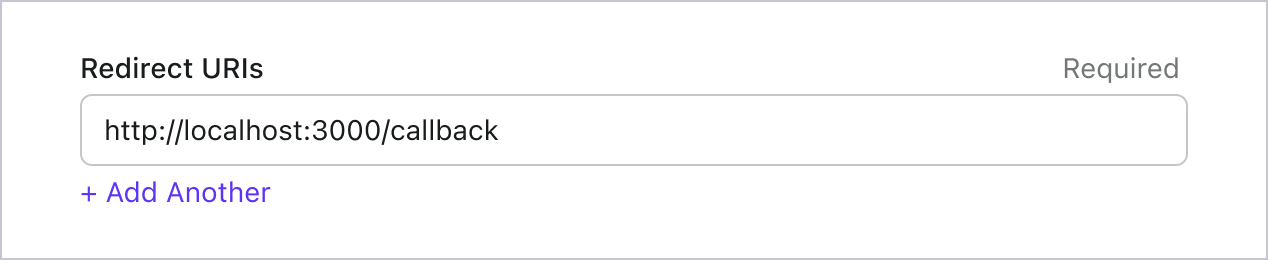
サインインと同様に、ユーザーは共有セッションからサインアウトするために Logto にリダイレクトされるべきです。完了したら、ユーザーをあなたのウェブサイトに戻すと良いでしょう。例えば、http://localhost:3000/ をサインアウト後のリダイレクト URI セクションとして追加します。
その後、「保存」をクリックして変更を保存します。
WebSecurityConfig の実装
プロジェクトに新しいクラス WebSecurityConfig を作成
WebSecurityConfig クラスは、アプリケーションのセキュリティ設定を構成するために使用します。認証 (Authentication) と認可 (Authorization) フローを処理する主要なクラスです。詳細は Spring Security ドキュメント を参照してください。
package com.example.securingweb;

import org.springframework.context.annotation.Configuration;
import org.springframework.security.config.annotation.web.configuration.EnableWebSecurity;

@Configuration
@EnableWebSecurity

public class WebSecurityConfig {
 // ...
}
idTokenDecoderFactory ビーンの作成
Logto はデフォルトで ES384 アルゴリズムを使用するため、デフォルトの OidcIdTokenDecoderFactory を上書きして同じアルゴリズムを使う必要があります。
import org.springframework.context.annotation.Bean;
import org.springframework.security.oauth2.client.oidc.authentication.OidcIdTokenDecoderFactory;
import org.springframework.security.oauth2.client.registration.ClientRegistration;
import org.springframework.security.oauth2.jose.jws.SignatureAlgorithm;
import org.springframework.security.oauth2.jwt.JwtDecoderFactory;

public class WebSecurityConfig {
  // ...

  @Bean
  public JwtDecoderFactory<ClientRegistration> idTokenDecoderFactory() {
    OidcIdTokenDecoderFactory idTokenDecoderFactory = new OidcIdTokenDecoderFactory();
    idTokenDecoderFactory.setJwsAlgorithmResolver(clientRegistration -> SignatureAlgorithm.ES384);
    return idTokenDecoderFactory;
  }
}
ログイン成功イベントを処理する LoginSuccessHandler クラスの作成
ログイン成功後、ユーザーを /user ページへリダイレクトします。
package com.example.securingweb;

import java.io.IOException;

import org.springframework.security.core.Authentication;
import org.springframework.security.web.authentication.AuthenticationSuccessHandler;

import jakarta.servlet.ServletException;
import jakarta.servlet.http.HttpServletRequest;
import jakarta.servlet.http.HttpServletResponse;

public class CustomSuccessHandler implements AuthenticationSuccessHandler {
  @Override
  public void onAuthenticationSuccess(HttpServletRequest request, HttpServletResponse response,
      Authentication authentication) throws IOException, ServletException {
    response.sendRedirect("/user");
  }
}
ログアウト成功イベントを処理する LogoutSuccessHandler クラスの作成
セッションをクリアし、ユーザーをホームページへリダイレクトします。
package com.example.securingweb;

import java.io.IOException;

import org.springframework.security.core.Authentication;
import org.springframework.security.web.authentication.logout.LogoutSuccessHandler;

import jakarta.servlet.ServletException;
import jakarta.servlet.http.HttpServletRequest;
import jakarta.servlet.http.HttpServletResponse;
import jakarta.servlet.http.HttpSession;

public class CustomLogoutHandler implements LogoutSuccessHandler {
  @Override
  public void onLogoutSuccess(HttpServletRequest request, HttpServletResponse response, Authentication authentication)
      throws IOException, ServletException {
    HttpSession session = request.getSession();

    if (session != null) {
      session.invalidate();
    }

    response.sendRedirect("/home");
  }
}
WebSecurityConfig クラスに securityFilterChain を追加
securityFilterChain は、リクエストとレスポンスを処理するフィルターチェーンです。
securityFilterChain を設定し、ホームページへのアクセスを許可し、それ以外のリクエストには認証 (Authentication) を要求します。ログイン・ログアウトイベントの処理には CustomSuccessHandler と CustomLogoutHandler を使用します。
import org.springframework.context.annotation.Bean;
import org.springframework.security.config.annotation.web.builders.HttpSecurity;
import org.springframework.security.web.DefaultSecurityFilterChain;

public class WebSecurityConfig {
  // ...

  @Bean
  public DefaultSecurityFilterChain securityFilterChain(HttpSecurity http) throws Exception {
    http
      .authorizeRequests(authorizeRequests ->
        authorizeRequests
          .antMatchers("/", "/home").permitAll() // ホームページへのアクセスを許可
          .anyRequest().authenticated() // それ以外は認証 (Authentication) 必須
      )
      .oauth2Login(oauth2Login ->
        oauth2Login
          .successHandler(new CustomSuccessHandler())
      )
      .logout(logout ->
        logout
          .logoutSuccessHandler(new CustomLogoutHandler())
      );
    return http.build();
  }
}
ホームページの作成
(すでにホームページがある場合はこの手順をスキップできます)
package com.example.securingweb;

import java.security.Principal;

import org.springframework.stereotype.Controller;
import org.springframework.web.bind.annotation.GetMapping;

@Controller
public class HomeController {
  @GetMapping({ "/", "/home" })
  public String home(Principal principal) {
    return principal != null ? "redirect:/user" : "home";
  }
}
このコントローラーは、ユーザーが認証 (Authentication) 済みならユーザーページへリダイレクトし、そうでなければホームページを表示します。ホームページにサインインリンクを追加します。
<body>
  <h1>Welcome!</h1>

  <p><a th:href="@{/oauth2/authorization/logto}">Logto でログイン</a></p>
</body>
ユーザーページの作成
ユーザーページを処理する新しいコントローラーを作成します:
package com.example.securingweb;

import java.security.Principal;
import java.util.Map;

import org.springframework.security.oauth2.client.authentication.OAuth2AuthenticationToken;
import org.springframework.security.oauth2.core.user.OAuth2User;
import org.springframework.stereotype.Controller;
import org.springframework.ui.Model;
import org.springframework.web.bind.annotation.GetMapping;
import org.springframework.web.bind.annotation.RequestMapping;

@Controller
@RequestMapping("/user")
public class UserController {

  @GetMapping
  public String user(Model model, Principal principal) {
    if (principal instanceof OAuth2AuthenticationToken) {
      OAuth2AuthenticationToken token = (OAuth2AuthenticationToken) principal;
      OAuth2User oauth2User = token.getPrincipal();
      Map<String, Object> attributes = oauth2User.getAttributes();

      model.addAttribute("username", attributes.get("username"));
      model.addAttribute("email", attributes.get("email"));
      model.addAttribute("sub", attributes.get("sub"));
    }

    return "user";
  }
}
ユーザーが認証 (Authentication) されると、認証済みプリンシパルオブジェクトから OAuth2User データを取得します。詳細は OAuth2AuthenticationToken および OAuth2User を参照してください。
ユーザーデータを読み取り、user.html テンプレートに渡します。
<body>
  <h1>ユーザー詳細</h1>
  <div>
    <p>
    <div><strong>name:</strong> <span th:text="${username}"></span></div>
    <div><strong>email:</strong> <span th:text="${email}"></span></div>
    <div><strong>id:</strong> <span th:text="${sub}"></span></div>
    </p>
  </div>

  <form th:action="@{/logout}" method="post">
    <input type="submit" value="ログアウト" />
  </form>
</body>
追加のクレーム (Claims) をリクエストする
principal (OAuth2AuthenticationToken) から返されるオブジェクトに一部のユーザー情報が欠けていることがあります。これは、OAuth
2.0 と OpenID Connect (OIDC) が最小特権の原則 (PoLP) に従うように設計されており、Logto
はこれらの標準に基づいて構築されているためです。
デフォルトでは、限られたクレーム (Claims) が返されます。より多くの情報が必要な場合は、追加のスコープ (Scopes) をリクエストして、より多くのクレーム (Claims) にアクセスできます。
「クレーム (Claim)」はサブジェクトについての主張であり、「スコープ (Scope)」はクレーム (Claims) のグループです。現在のケースでは、クレーム (Claim) はユーザーに関する情報の一部です。
スコープ (Scope) とクレーム (Claim) の関係の非規範的な例を示します:
「sub」クレーム (Claim) は「サブジェクト (Subject)」を意味し、ユーザーの一意の識別子(つまり、ユーザー ID)です。
Logto SDK は常に 3 つのスコープ (Scopes) をリクエストします:openid、profile、および offline_access。
追加のユーザー情報を取得するには、application.properties ファイルにスコープを追加します。たとえば、email、phone、urn:logto:scope:organizations スコープをリクエストする場合、次の行を application.properties に追加します:
spring.security.oauth2.client.registration.logto.scope=openid,profile,offline_access,email,phone,urn:logto:scope:organizations
その後、OAuth2User オブジェクトで追加のクレーム (Claims) にアクセスできます。
アプリケーションの実行とテスト
アプリケーションを実行し、http://localhost:8080 にアクセスします。
- サインインリンク付きのホームページが表示されます。
- リンクをクリックして Logto でサインインします。
- 認証 (Authentication) に成功すると、ユーザーページにリダイレクトされ、ユーザー情報が表示されます。
- ログアウトボタンをクリックするとサインアウトし、ホームページに戻ります。
スコープ (Scopes) とクレーム (Claims)
Logto は OIDC の スコープ (Scope) とクレーム (Claims) の規約 を使用して、ID トークンおよび OIDC userinfo エンドポイント からユーザー情報を取得するためのスコープ (Scope) とクレーム (Claims) を定義します。「スコープ (Scope)」と「クレーム (Claim)」は、OAuth 2.0 および OpenID Connect (OIDC) の仕様からの用語です。
簡単に言えば、スコープ (Scope) をリクエストすると、ユーザー情報に対応するクレーム (Claims) が取得されます。例えば、email スコープ (Scope) をリクエストすると、ユーザーの email と email_verified データが取得されます。
こちらはサポートされているスコープと対応するクレーム (Claims) の一覧です:
標準 OIDC スコープ
openid(デフォルト)
| Claim name | Type | 説明 |
|---|---|---|
| sub | string | ユーザーの一意の識別子 |
profile(デフォルト)
| Claim name | Type | 説明 |
|---|---|---|
| name | string | ユーザーのフルネーム |
| username | string | ユーザー名 |
| picture | string | エンドユーザーのプロフィール画像の URL。この URL は画像ファイル(例:PNG、JPEG、GIF 画像ファイル)を指す必要があり、画像を含む Web ページではありません。この URL は、エンドユーザーを説明する際に表示するのに適したプロフィール写真を特に参照するべきであり、エンドユーザーが撮影した任意の写真ではありません。 |
| created_at | number | エンドユーザーが作成された時刻。Unix エポック(1970-01-01T00:00:00Z)からのミリ秒数で表されます。 |
| updated_at | number | エンドユーザー情報が最後に更新された時刻。Unix エポック(1970-01-01T00:00:00Z)からのミリ秒数で表されます。 |
その他の 標準クレーム (Standard Claims) には、family_name、given_name、middle_name、nickname、preferred_username、profile、website、gender、birthdate、zoneinfo、locale などがあり、これらも profile スコープに含まれます(userinfo エンドポイントをリクエストする必要はありません)。上記のクレームとの違いは、これらのクレームは値が空でない場合のみ返される点です。一方、上記のクレームは値が空の場合 null が返されます。
標準クレーム (Standard Claims) とは異なり、created_at および updated_at クレームは秒ではなくミリ秒を使用しています。
email
| Claim name | Type | 説明 |
|---|---|---|
string | ユーザーのメールアドレス | |
| email_verified | boolean | メールアドレスが認証済みかどうか |
phone
| Claim name | Type | 説明 |
|---|---|---|
| phone_number | string | ユーザーの電話番号 |
| phone_number_verified | boolean | 電話番号が認証済みかどうか |
address
アドレスクレームの詳細については OpenID Connect Core 1.0 を参照してください。
(デフォルト) と記載されたスコープは常に Logto SDK によってリクエストされます。標準 OIDC スコープ下のクレーム (Claims) は、対応するスコープがリクエストされた場合、常に ID トークン (ID token) に含まれます — 無効化できません。
拡張スコープ
以下のスコープは Logto によって拡張されており、userinfo エンドポイント を通じてクレーム (Claims) を返します。これらのクレームは Console > Custom JWT を通じて ID トークン (ID token) に直接含めるよう設定することもできます。詳細は カスタム ID トークン を参照してください。
custom_data
| Claim name | Type | 説明 | デフォルトで ID トークンに含まれるか |
|---|---|---|---|
| custom_data | object | ユーザーのカスタムデータ |
identities
| Claim name | Type | 説明 | デフォルトで ID トークンに含まれるか |
|---|---|---|---|
| identities | object | ユーザーのリンク済みアイデンティティ | |
| sso_identities | array | ユーザーのリンク済み SSO アイデンティティ |
roles
| Claim name | Type | 説明 | デフォルトで ID トークンに含まれるか |
|---|---|---|---|
| roles | string[] | ユーザーのロール | ✅ |
urn:logto:scope:organizations
| Claim name | Type | 説明 | デフォルトで ID トークンに含まれるか |
|---|---|---|---|
| organizations | string[] | ユーザーが所属する組織 ID | ✅ |
| organization_data | object[] | ユーザーが所属する組織データ |
これらの組織クレーム (Organization Claims) は、不透明トークン (Opaque token) を使用している場合でも userinfo エンドポイント経由で取得できます。ただし、不透明トークン (Opaque token) は組織トークン (Organization token) として組織固有リソースへのアクセスには使用できません。詳細は 不透明トークン (Opaque token) と組織 (Organizations) を参照してください。
urn:logto:scope:organization_roles
| Claim name | Type | 説明 | デフォルトで ID トークンに含まれるか |
|---|---|---|---|
| organization_roles | string[] | ユーザーが所属する組織ロール(<organization_id>:<role_name> 形式) | ✅ |
追加のユーザー情報をリクエストするために、application.properties ファイルに追加のスコープ (Scope) とクレーム (Claims) を追加します。例えば、urn:logto:scope:organizations スコープ (Scope) をリクエストするには、次の行を application.properties ファイルに追加します:
spring.security.oauth2.client.registration.logto.scope=openid,profile,offline_access,urn:logto:scope:organizations
ユーザーの組織 (Organization) クレーム (Claims) は、認可トークン (Authorization token) に含まれます。