設定 SAML Assertion 屬性
SAML 屬性是 SAML Assertion 的關鍵組成部分,攜帶經驗證使用者的特定資訊。這些屬性可以包含使用者識別碼、角色 (Roles)、權限 (Permissions) 以及服務提供者 (SP, Service Provider) 進行授權 (Authorization) 與個人化所需的其他相關使用者資料。
理解 SAML 屬性
在 SAML 驗證 (Authentication) 中:
- 屬性是包含使用者資訊的名稱-值配對
- 它們包含在從身分提供者 (Logto) 傳送給服務提供者的 SAML Assertion 中
- 它們協助服務提供者根據使用者資訊做出存取與個人化決策
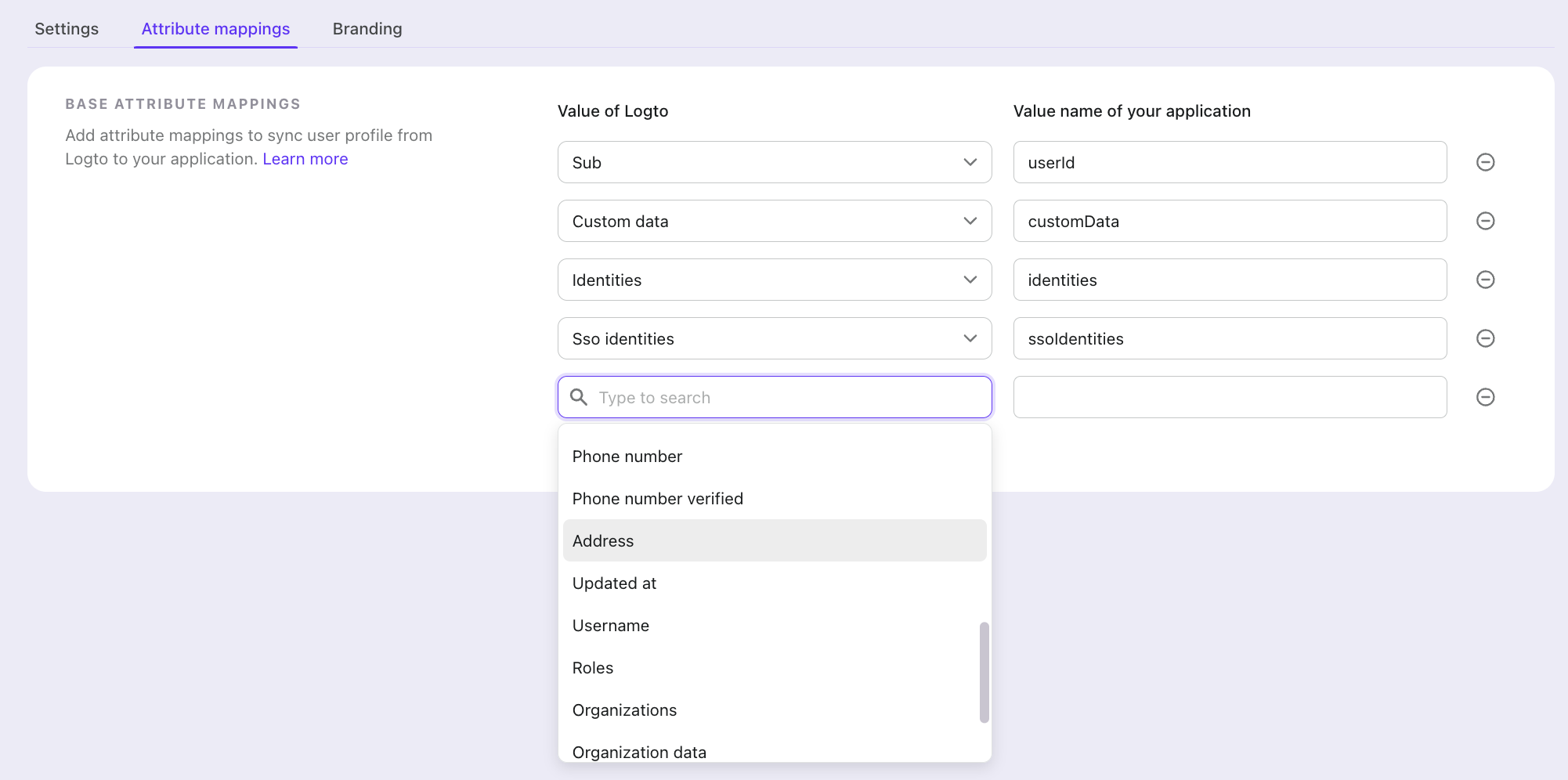
Logto 中的屬性對應
屬性對應 (Attribute mapping) 讓你定義 Logto 的使用者資訊如何對應到 SAML Assertion 中的特定屬性。這樣可確保服務提供者收到預期格式與名稱的使用者資訊。
設定屬性對應時:
- 你指定哪些 Logto 使用者屬性要包含在 SAML Assertion 中
- 你定義服務提供者預期的自訂屬性名稱
- 驗證 (Authentication) 時,對應後的屬性會自動包含在 SAML Assertion 內
常見屬性
常用的 SAML 屬性包括:
- Sub(使用者 ID)
- 組織 (Organizations)
- Name
- Preferred username
妥善設定屬性對應,可確保服務提供者獲得所有必要的使用者資訊,為你的使用者提供適當的存取與個人化體驗。
你可以利用屬性對應設定,將所有 Logto 可用的使用者資訊對應到 SP 預期的屬性。
靜態屬性
部分服務提供者會要求每位使用者都相同的屬性,例如用於識別你帳號或網站的 ID。靜態屬性 (Static attributes) 是 Logto 會在應用程式每個 SAML Assertion 中加入的固定名稱-值配對,與對應的使用者屬性一同傳送。
例如,NetSuite SuiteCommerce 整合可能需要 account 與 site 屬性:
| 屬性名稱 (Attribute name) | 值 (Value) |
|---|---|
account | 你的 NetSuite 帳號 ID |
site | 你的網站 ID |
在 Console 設定靜態屬性
- 前往 Console > 應用程式 (Applications) 並開啟你的 SAML 應用程式。
- 開啟 屬性對應 (Attribute mappings) 分頁,並在 基本屬性對應 (Base attribute mappings) 下方找到 靜態屬性 (Static attributes) 卡片。
- 在 Key 輸入屬性名稱,在 Value 輸入其值。點擊 Add another 新增更多屬性。若要移除最後一個屬性,請清空其 key 與 value。
- 點擊 Save changes。
透過 Management API 設定靜態屬性
在使用 Management API 建立 或 更新 SAML 應用程式時,設定 staticAttributes:
curl \
  --request PATCH \
  --header 'Authorization: Bearer <access-token>' \
  --header 'Content-Type: application/json' \
  --data '{"staticAttributes": {"account": "<your-account-id>", "site": "<your-site-id>"}}' \
  'https://[tenant-id].logto.app/api/saml-applications/<application-id>'
包含 staticAttributes 的更新會取代整個物件,因此請包含你想保留的所有靜態屬性。若要保持不變則省略該欄位,或傳送 {} 以移除全部。
靜態屬性規則
- 屬性名稱可包含 ASCII 字母、數字,以及
_ - . : / # @字元,因此像http://schemas.example.com/claims/site或urn:oid:1.3.6.1.4.1.5923.1.1.1.6這類 URI 與 OID 名稱皆可接受。 - 每個靜態屬性必須有單一且非空字串值。
- 名稱不得彼此衝突,也不得與 Assertion 內的使用者屬性名稱衝突:即屬性對應中 你的應用程式的值名稱 (Value name of your application) 欄位的名稱,或未對應時的
sub、email、name。Logto 會將名稱轉為 camel case,並以.,_,-為單字分隔符進行比較,因此site_id、site.id、SiteId會衝突,account與Account也會衝突。變更屬性對應時也會進行相同檢查。若儲存時出現衝突,請重新命名其中一個屬性。
Assertion 內所有屬性(對應與靜態)皆使用 urn:oasis:names:tc:SAML:2.0:attrname-format:basic NameFormat,並以 xs:string 傳送。如果你的服務提供者預期 URI 或 OID 名稱且使用 urn:oasis:names:tc:SAML:2.0:attrname-format:uri NameFormat,請確認其也接受 basic。